
The Trade Reference Experience
See what your customer’s trade references experience when completing a trade reference request via an application powered by Credit Pulse.
This guide walks through exactly what your customer’s trade references will receive and how they complete a request through Credit Pulse.
The process is designed to be fast for the reference, secure by design, and consistent for your team.
How Requests Are Sent
Trade reference requests can be triggered in two ways:
Automatic: Sent immediately when the application is submitted
Manual: Sent from your dashboard when you click “send”
Either way, the experience for the reference is the same. If you need to check or change your settings, reach out to support@creditpulse.com.
What the Reference Receives
The reference receives a branded email that:
Identifies your company and the applicant
Explains they’ve been listed as a trade reference
Includes a secure way to complete the request
How They Access the Form
We provide multiple access options to ensure the request can be completed even in environments with strict email or security controls.
Different companies have different email and security settings. Some block links, rewrite URLs, or prevent clicks entirely.
Multiple access paths ensure:
The request can still be completed
Security is maintained through email and code validation
Your team does not need to manually follow up
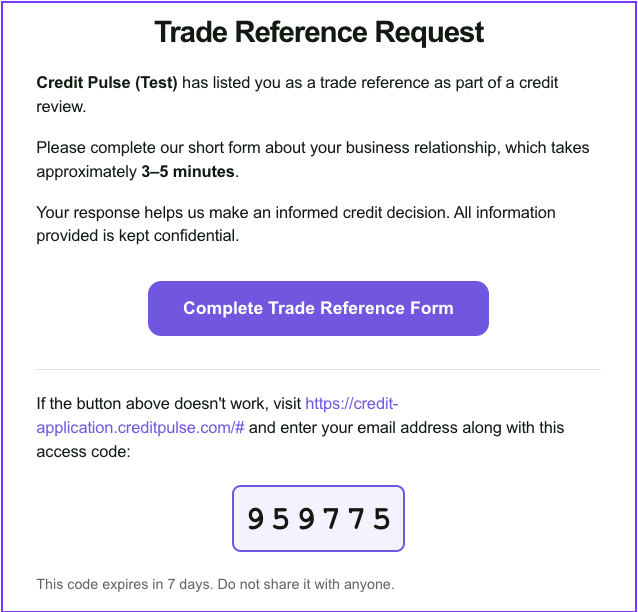
Option #1 - Click the Button
This is the most common pathway. The reference clicks “Complete Trade Reference Form” in the email and is taken directly to the form.
No login required
Mobile-friendly
Takes about 2–3 minutes
Option #2 - Use An Access Code
To support stricter security settings, references can access the form using a code if links are blocked or flagged.
First, the reference will be directly to go to our website directly: credit-application.creditpulse.com
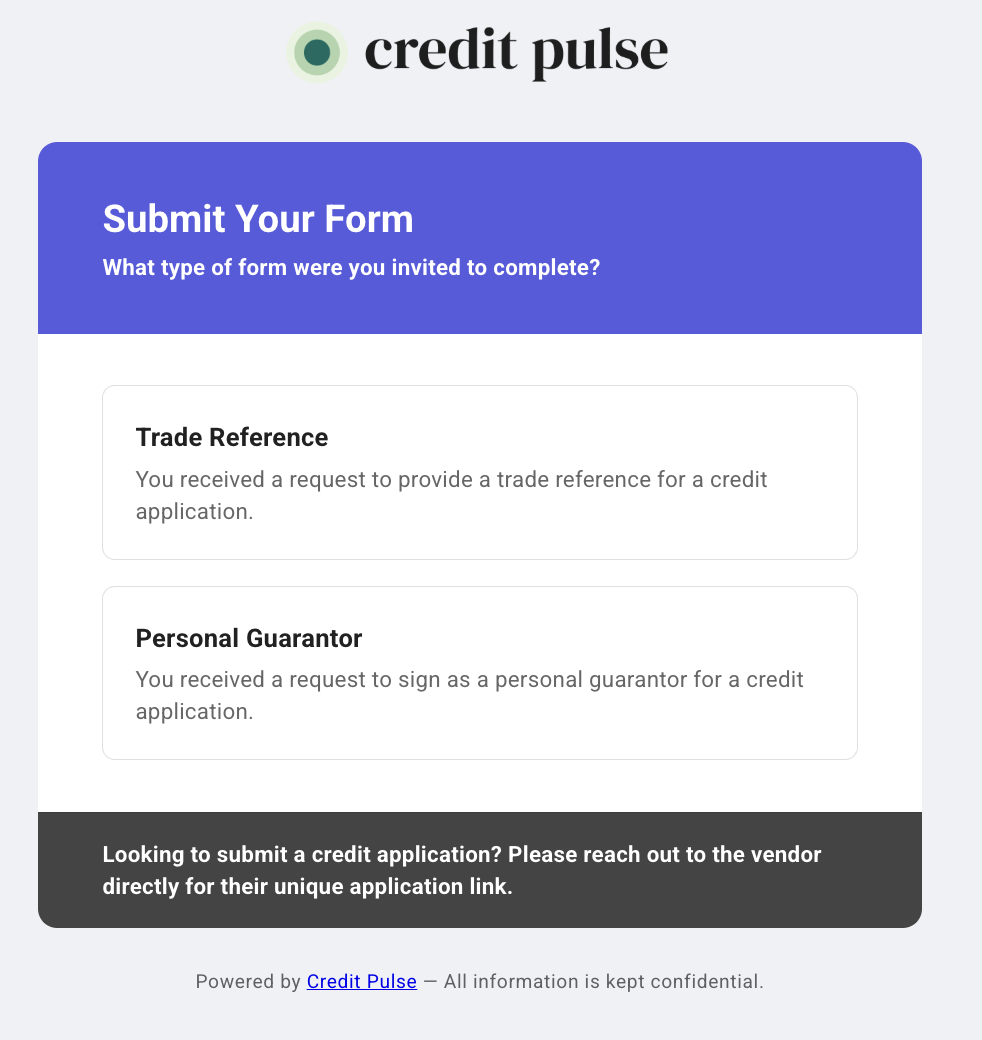
Then, they will be asked to select the form type, in this case: Trade Reference
Next, they will be asked to enter their email address and the 6-digit access code from the email.
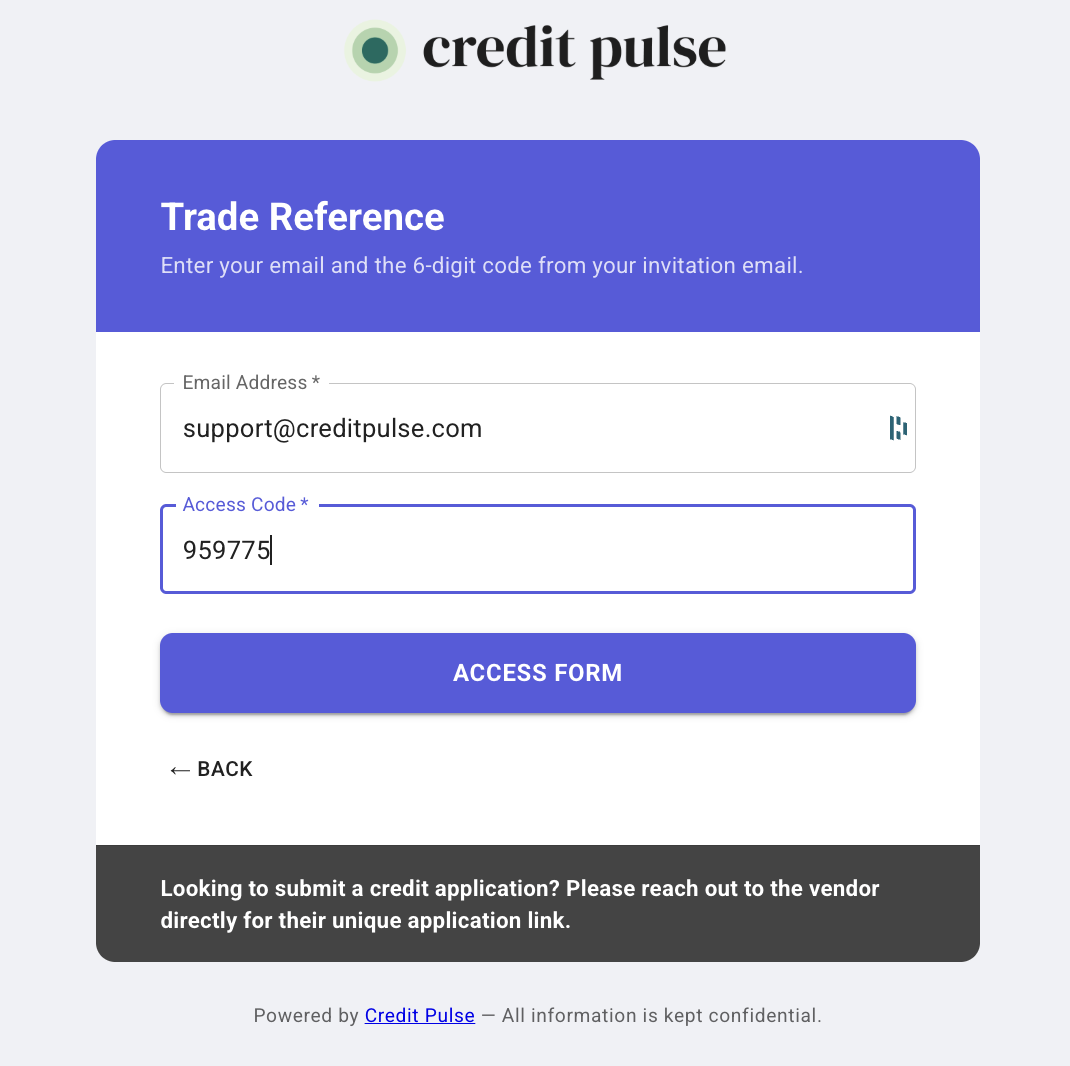
👉 Note: If the email and access code do not match, access will be denied.
The Trade Reference Form
The form is short and standardized to make completion easy and responses consistent. Here are the questions we include:
Account Details
Since what year has this account been active?
What type of account do they have?
Credit History
What is their current balance?
What is the highest credit balance extended?
What are their terms of sale?
What is their average monthly volume of business?
Payment Behavior
Does the customer pay according to terms?
On average, how many days does this customer take to pay?
Is the account currently past due?
If past due, by how many days?
Have any payments been returned (NSF)?
Have you placed the customer on credit hold or collections?
Have you experienced any payment disputes or issues?
Account Assessment
Is this account in good standing?
Would you continue to extend credit to this customer?
Is there anything else we should know about this customer?
Length of relationship
Monthly purchase volume
Payment behavior (on-time, late, disputes)
Notes or additional context
💡 Note: Forms are standardized based on credit manager research and best practices, so you get consistent, comparable data across all references.

Reminder Emails
If the form isn’t completed after the first request, teams can manually send reminders via the application in our platform. This controls the number of outreaches, while also alerting your team of how many reminders are sent.

The Automation Benefits
Teams who leverage our trade reference automation benefit from:
Faster credit approvals: Automated outreach reduces turnaround time.
Higher completion rates: Easy, mobile-friendly forms lead to more responses.
Better risk insights: Standardized questions collect and verify responses.
Less manual work: Free your team from chasing references and paper.
Frequently Asked Questions
Do trade references need an account or to login?
No, they simply click the secure link and fill out the form.
How long does it take to complete?
On average, less than 3 minutes.
Can I change the questions on the form?
The form is standardized to maintain consistency, but reach out to support@creditpulse.com for customization options.
What if a trade reference doesn’t respond?
Teams can send reminders as often as needed until the form is completed. There is also an option to quickly request additional trade references from the applicant.
Contact Us
💌 Reach out to our support team anytime at support@creditpulse.com
🚀 New to Credit Pulse? Book a demo with our team today.